

Premium TV Launcher UI
EN
Get it on your TV

Short articles about Android TV launchers from the makers of Premium TV Launcher UI (PLUI): choosing between minimal and premium, ten user profiles on one TV, widgets that work on a big screen, removing home-screen ads, the HOME button problem, and security cameras on the TV.

Posts

Short reads, one topic each

Five minutes or less. No hype — just how TV launchers work and what Premium TV Launcher UI (PLUI) does about it.

01 · Choosing

Minimal or Premium? How to choose your TV launcher

3 min read

Replace your TV's stock home screen and two schools of launcher are waiting for you. Knowing which school you belong to matters more than any feature list.

The minimal school — Projectivy, AT4K, Monet, Arc — believes a home screen should disappear. Your apps in a clean, Apple-TV-style grid, a wallpaper behind them, nothing else. They are fantastic at this. If you open the TV, press one icon and watch for three hours, a minimal launcher is probably all you need — and the ones above are free or nearly free.

The premium school believes the home screen is the living room's most-seen surface — so it should be worth looking at. That is PLUI's seat: glass widgets over your own wallpaper, weather drawn as art, ten profiles for the family, security cameras beside the forecast, aerial video backgrounds up to 8K. Not quieter — richer.

A quick self-test: if your ideal home screen is the one you notice least, go minimal — genuinely, you'll be happy. If you keep pausing on it, showing it to guests, or sharing the TV with a family, you're in premium territory.

There's no wrong answer. One is a style. The other is an experience.
Try it. Judge for yourself.Get PLUI free
02 · Profiles

10 profiles on one TV — finally

3 min read

Phones learned this years ago: different people, different home screens. TVs never did. Google TV only recently added profiles — and only for kids. Everyone else shares one screen, one layout, one history. People have been asking for proper TV profiles for as long as the platform has existed.

PLUI treats the TV like what it is: the most shared screen in the house. Up to ten profiles, each behind a "Who's watching?" screen with an avatar — pick from 100+ portraits or use your own photo.

Each profile is a complete, separate home: its own apps and categories, its own wallpapers and theme, its own language, its own widgets and screensaver. Grandma's giant-clock layout doesn't touch the kids' cartoon grid. A PIN protects any profile that wants one, and per-user permissions decide who may change what — let the kids try everything, and keep "save" behind the admin's PIN.

One honest note: these are launcher profiles. Netflix and the other streaming apps keep their own logins and their own profile pickers — no launcher can change that. What PLUI separates is everything around the apps: layout, access, look, language.

Ten profiles. One TV. Everyone gets their own.

Try it. Judge for yourself.Get PLUI free
03 · Widgets

Widgets on a TV that actually make sense

3 min read

TV widgets have a bad history. Either the launcher is minimal and has none — reviewers list that as a real "against" — or it crams phone widgets onto a 55-inch screen, tiny and unreadable from the couch.

PLUI's answer is a widget dashboard: a 2×4 grid you compose yourself, from widgets designed for a screen you sit three meters away from. Big type, glass surfaces, no clutter.

What goes in the slots: 38 clocks and 80 weather faces — live data drawn as art, not a number in a corner. Eleven media views: Now Playing, Up Next, Continue Watching, Watchlist, live channels, recordings, top movies from the providers of your installed apps, screen time, a sleep timer, radio. Nine system views for storage, network and device health. A photo frame. A month calendar. Even live security cameras.

The dashboard lives one press away on the sidebar — or IS your home screen, if you want a TV that greets you with the day instead of a wall of icons. Rearrange everything in edit mode with the remote; nothing needs a mouse.

A TV screen is the biggest, best-placed display in your house. It can do more than hold icons.

Try it. Judge for yourself.Get PLUI free
04 · No ads

Getting rid of home-screen ads for good

3 min read

You bought the TV. Then the home screen started selling you things: sponsored rows, promoted "recommendations", banner campaigns for shows you never asked about. It is the single biggest reason people go looking for a different launcher — and they are right to.

The fix is simpler than it sounds: the home screen is just an app, and apps can be replaced. Install a launcher you trust, make it your default, and the ads are gone — not hidden, gone. The stock home screen simply never runs.

Every serious alternative launcher is ad-free; it's the founding promise of the whole category, and the minimal ones honor it well. PLUI honors it too, and states it plainly: no ads, no sponsored rows, no "recommendations" you didn't ask for — and no selling your data. What fills the space instead is yours: your apps, your widgets, your wallpapers, your family's profiles.

Two honest notes. First, apps keep their own insides — a launcher cleans the front door, not what's behind each app's own door. Second, on some TVs the HOME button needs one extra step to point at your new launcher; our sideload guide covers every case in a few minutes.

Your TV's front door belongs to you. Take it back once, and it stays yours.

Try it. Judge for yourself.Get PLUI free
05 · Home button

The HOME button problem — and every way around it

4 min read

Here is the one honest wrinkle in every "replace your launcher" story: Android TV does not make it easy. On phones you pick a default launcher in settings; on many TV boxes the HOME button is hard-wired to the stock launcher, and Google offers no picker. Every alternative launcher lives with this — it's a platform decision, not anyone's bug.

What matters is how gracefully a launcher works around it. PLUI ships every route in the box:

The Play Store build requests the launcher role, so on devices that allow it, PLUI becomes the real default — HOME button included — the supported, no-tricks way.

The sideload build (Fire TV, older boxes) uses an accessibility service to catch HOME reliably, plus auto-boot so PLUI greets you when the box starts. Setup is a guided wizard, not a forum thread.

Shortcut buttons go further while you're in the launcher: Num 1 opens Games, the red button opens Favorites — single, double or long press, your choice.

And the honest boundary: remapping buttons globally, inside other apps, is a different job — that's our companion app, Button Mapper TV, built exactly for it. No launcher can promise that from inside itself, whatever its store page says.

Five minutes of setup, once. Then the button does what it always should have: bring you home.

The full guide, with the ADB route for experts →

Try it. Judge for yourself.Get PLUI free
06 · Cameras

Security cameras on your home screen

3 min read
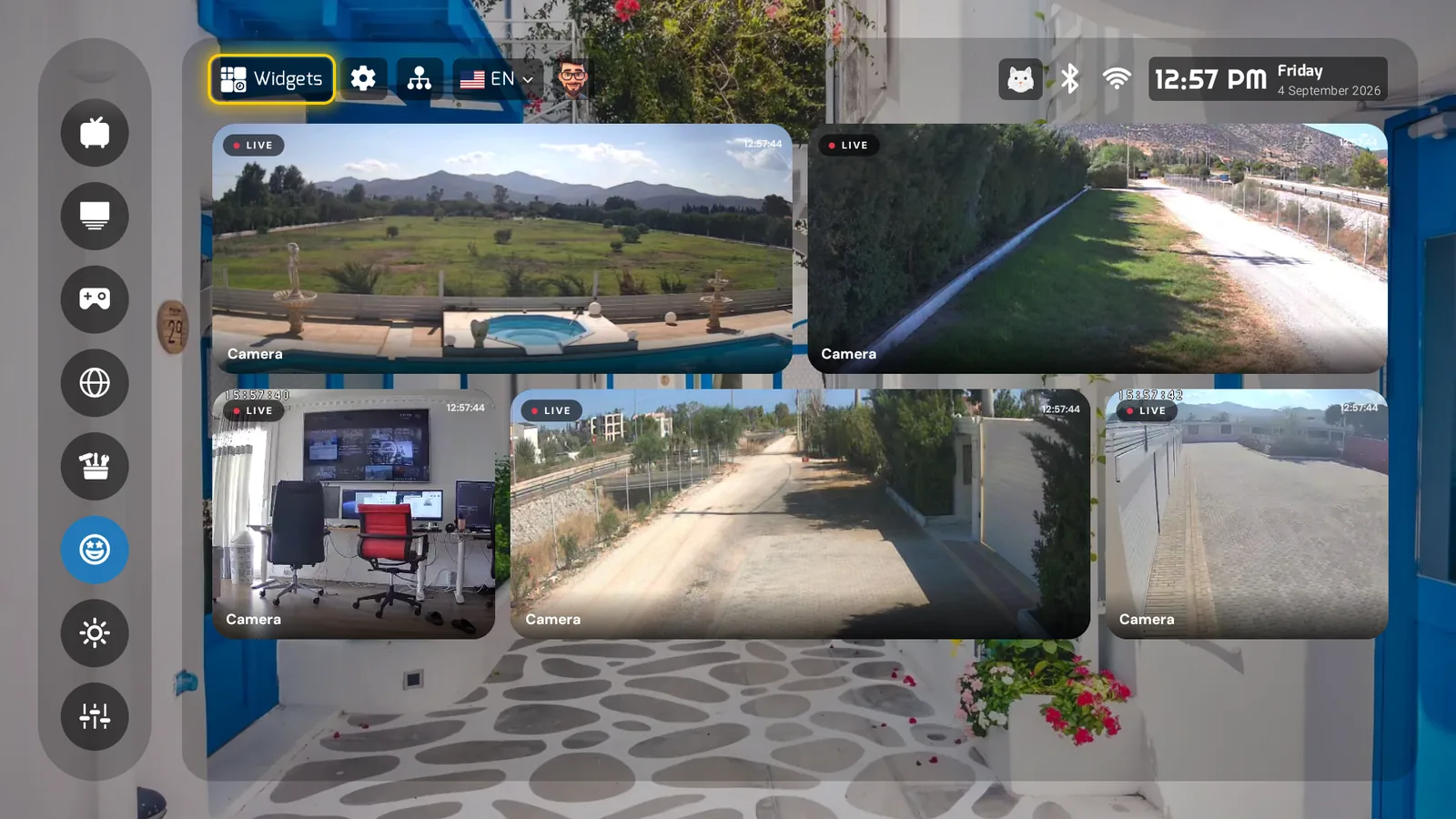
Three live camera feeds on the PLUI widget dashboard

The doorbell rings during the movie. In most houses that means finding a phone, opening an app, waiting for it to connect — while someone stands at the door. Meanwhile the biggest screen in the house shows a paused frame.

PLUI puts your cameras on the TV's home screen: live tiles on the widget dashboard, one press of HOME away. The front door, the driveway, the pool, the baby's room — glanceable from the couch, on glass, next to the clock and the weather.

It speaks ONVIF and RTSP — the open standards most IP cameras, NVRs and doorbell systems already publish — and it has been tested against real hardware, not just a spec sheet. If your camera exposes a standard stream, PLUI can show it. No cloud subscription in the middle, no extra box: the stream goes from your camera to your TV over your own network.

Honest scope, as always: PLUI is a viewer, not a recorder — recordings, motion alerts and PTZ stay with your camera system. And cameras that only talk to their own closed cloud app can't be viewed by anything else, PLUI included.

No other launcher even attempts this. For once, "check the cameras" means glancing at the TV that's already on.

Try it. Judge for yourself.Get PLUI free